
Enhanced Collins Dictionary Access for Shanbay
Overview
The Shanbay Chrome Extension, version 1.6, is a specialized utility designed to enhance the dictionary functionality within the Shanbay learning platform. Its primary purpose is to modify how the Collins Dictionary content is loaded, enabling users to access all definitions and example sentences instead of just the default entry. This addresses a key limitation in the standard Shanbay experience, where only partial dictionary data is displayed.
Target users include language learners, students, and professionals focused on vocabulary expansion who rely on detailed lexical information. The extension is particularly useful for those who require comprehensive word analysis during study sessions. It integrates directly into the browser environment, working alongside the Shanbay interface without requiring changes to the core platform.
Developed by an independent contributor, the tool is maintained through community feedback, as indicated by the invitation to submit suggestions via email and GitHub. The developer did not provide additional background details. Real-world usage scenarios include academic research, self-study, and language preparation for exams or professional communication.
Key Features & Capabilities
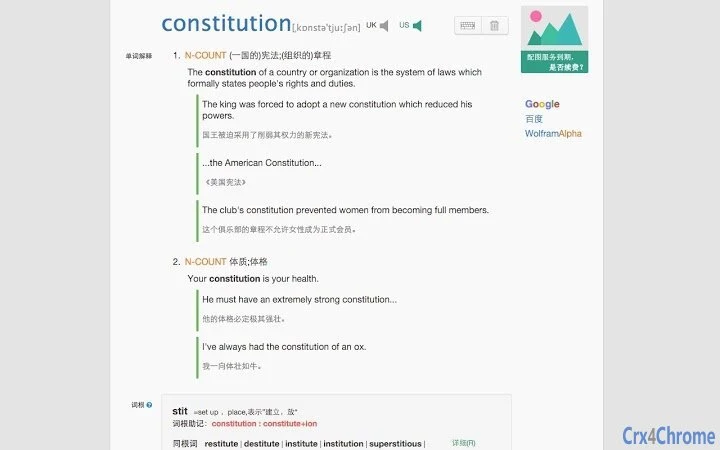
- Full Collins Dictionary Access: Bypasses the default restriction of displaying only one definition and example. Users can view all available meanings and their corresponding examples, improving depth of understanding.
- Flexible Source Selection: Offers users the choice between loading dictionary content from Baidu Translation or the Shanbay platform itself. This allows for optimization based on speed and reliability preferences.
- Performance-Optimized Default: The developer recommends using Baidu Translation as the primary source due to faster load times, especially given known limitations in Shanbay’s API response speed.
- Enhanced Research Tools: Adds direct links to search engines and the Merriam-Webster Dictionary, enabling quick access to visual references and alternative definitions without leaving the current tab.
- Interface Streamlining: Removes the default example and note panels to reduce clutter and improve focus on core content, creating a cleaner, more efficient study environment.
These capabilities are especially beneficial during intensive vocabulary review or when preparing for language proficiency assessments. The ability to access complete lexical data supports deeper contextual learning and retention.
User Interface, Workflow & Performance
The extension operates as a lightweight browser add-on with a minimalistic interface. It integrates seamlessly into the Shanbay interface, activating automatically when relevant content is displayed. Navigation is straightforward—users simply interact with the enhanced dictionary panel that appears during word lookup.
Workflow efficiency is improved through the removal of redundant panels and the addition of direct search and dictionary links. This reduces the number of steps required to access supplementary information, streamlining the learning process. The user experience is designed to remain unobtrusive, maintaining focus on the primary study material.
Performance details were not specified by the developer. However, based on general software behavior patterns, the extension functions as a background script that processes requests and renders content dynamically. The developer did not specify resource usage details. Stability is maintained through regular updates, including a recent fix for compatibility with Shanbay’s HTTPS-only access.
Compatibility & System Requirements
The extension is compatible with Windows, Mac, and Linux operating systems, ensuring broad accessibility across desktop environments. It is designed specifically for use with the Google Chrome browser, as it is a Chrome Extension.
The installation size is 2.3 MB, which is relatively small and does not impose significant storage demands. The software version is 1.6, released on May 10, 2024. Exact system requirements were not listed, and no hardware specifications were provided.
Platform compatibility information is limited to the supported OSes and browser. The developer did not provide additional details about minimum RAM, CPU, or other technical prerequisites.
Pros and Cons
Pros
- Provides full access to Collins Dictionary definitions and examples
- Offers flexibility in choosing between Baidu Translation and Shanbay as data sources
- Improves study workflow with a cleaner, more focused interface
- Includes useful links for image searches and Merriam-Webster lookup
- Regular updates to maintain compatibility with platform changes
Cons
- Requires prior purchase of the Shanbay Collins Dictionary add-on to unlock full features
- Performance may vary depending on the selected data source
- Interface is minimal and may lack advanced customization options
- Support is limited to email and GitHub, with no official help center
- Dependent on third-party APIs, which may change without notice
FAQ Section
Is this extension compatible with all versions of Chrome?
The extension is designed for Chrome browsers, but specific version compatibility was not detailed by the developer. Users are advised to ensure their browser is up to date.
Can I use this extension without purchasing the Shanbay Collins Dictionary add-on?
No. The full functionality, including access to all Collins definitions and examples, requires a prior purchase of the Shanbay Collins Dictionary extension.
Is the extension secure to install?
As a Chrome extension, it operates under the browser’s security model. The developer has not provided a public security audit, but the source code is available on GitHub for review.
How often are updates released?
Updates are released as needed, particularly to address compatibility issues such as the recent change to Shanbay’s HTTPS-only access. The latest version is 1.6, released on May 10, 2024.
Can I use this tool offline?
Due to reliance on external APIs from Baidu Translation and Shanbay, the extension requires an active internet connection to function. Offline usage is not supported.
Final Thoughts + CTA
For language learners and vocabulary enthusiasts using Shanbay, this extension offers a meaningful enhancement to the dictionary experience. By unlocking full access to Collins definitions and examples, it transforms a limited feature into a comprehensive learning tool. The ability to choose between data sources and access supplementary resources adds practical value.
While it requires a purchase of the base dictionary add-on and depends on external services, its lightweight design, regular updates, and community-driven development model make it a reliable choice. The clean interface and efficient workflow support focused, effective study sessions.
Download Enhanced Collins Dictionary Access for Shanbay now







